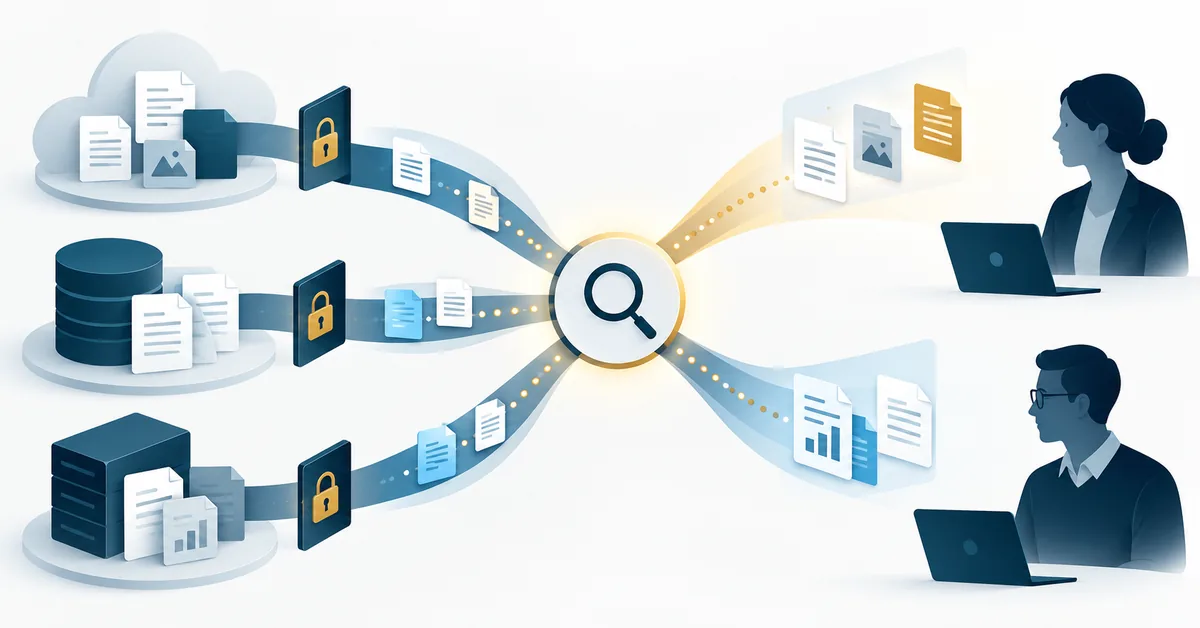
A business search assistant can return a convincing answer while the deployment team still has not settled a more basic question: should this person be able to retrieve that information at all? Connecting another repository is therefore a permissions decision, not just a search-quality upgrade.
This guide is for teams evaluating Gemini Enterprise connectors. It separates product editions, data movement and identity checks, then proposes a small access-validation exercise. CoreSecTech has not tested a customer deployment or demonstrated a vulnerability. Official sources were rechecked on 23 October 2026. The examples and featured illustration are conceptual; the checks below were not performed.
Identify the product before borrowing its instructions
Start your configuration record with the exact edition, application and connector. Do not substitute a personal Gemini account’s Connected Apps instructions for a Cloud-managed Gemini Enterprise data store, or assume a Business edition screen matches a Standard or Plus deployment.
Google’s Business edition connector guide, updated October 15, 2026, describes connecting through Settings & help, selecting the team, then Manage team and Connectors. It also lists supported actions, which can include changes to connected systems rather than search alone. A connector labelled available does not establish that every user, action or source is approved for your organization.
For personal Gemini access and deletion questions, use the separate Connected Apps and data-retention guide. This article addresses a different question: how a business deployment decides what users may retrieve and do.
Separate data movement from access enforcement
The Cloud connector overview distinguishes federation, which retrieves from a source without copying content into the Gemini Enterprise index, from ingestion, which indexes copied data. Not every connector offers both methods.
Federation does not mean no information leaves the conversation boundary. Google warns that federated queries are sent to enabled third-party search backends and may include information from the request and conversation history. For indexed connectors, check content updates, identity updates and deletion handling separately. Google’s connector overview says incremental sync captures added or updated entity data, not identity data or entity deletions. Identity sync updates user/group information; full entity sync handles source additions, updates and deletions. These connector schedules are not a universal rule for custom-source imports.
CoreSecTech’s analysis: neither route is universally safer or better. Write down the specific connector’s supported method, the data owner, the permitted query content and the documented synchronization behaviour before choosing one. A business requirement for fresh permissions is not satisfied merely by seeing a recent document-content sync.
| Question | Evidence to obtain | Weak substitute |
|---|---|---|
| Can the user enter the app? | Assigned user or group and the authenticated identity | The administrator can open it |
| Can that user retrieve this document? | Source permission, applicable ACL mapping and a scoped result check | The connector reports connected |
| Can the connector perform a write? | Supported action and granted authorization for that identity | The task sounded like a search |
| Has revoked access propagated? | Connector-specific identity/deletion sync information and a recheck | A newer content timestamp |
Use the right access-control evidence
Google’s Enterprise FAQ describes application access and connector-data access as separate checks for Standard and Plus. Its document-level access-control claims are vendor descriptions, not a certification of your configuration. Do not turn them into a promise that connecting a source needs no permission review.
Documented example: an indexed Cloud Storage source
Illustrative and untested: this example uses one-time ingestion of unstructured Cloud Storage documents into an access-controlled store, not periodic ingestion or every native connector. Use an authorized test store with harmless content. BigQuery and other data formats have their own procedures.
Google’s custom-source access-control instructions require document reader metadata and an access-controlled store. An authenticated identity is the signed-in search user identified through the configured identity provider. Reader principals are the users or groups listed in a document’s acl_info; their IDs must map to the intended identities.
For a restricted test note, the ACL fragment could be:
{
  "acl_info": {
    "readers": [{
      "principals": [{"user_id": "user_a"}]
    }]
  }
}
user_a is an illustrative identifier, not a real account. This fragment is not a complete import payload. For the shared note, list both intended user principals. Group-based access instead needs the corresponding group principal and membership mapping.
During store creation, select This data store contains access control information. Import the document metadata from the same bucket as the unstructured content; Google’s API procedure uses GcsSource.dataSchema set to document. Follow the complete linked setup, including identity configuration, rather than pasting this fragment into production.
Google’s Cloud Storage import guide says source bucket/object permissions are not copied automatically. Its periodic-ingestion preview does not enforce data-source ACLs, even if imported data contains them. Do not use that path for this ACL example.
Have the owner record the app, attached store, authenticated test identities and expected readers before testing. The ability to ingest an object does not establish who may retrieve it.
Two documents, two users: establish the positive control
Illustrative expected-access matrix—not observed results: use two harmless notes with distinct, non-sensitive phrases. Both test users should have approved application access. Give the shared note reader principals for A and B; restrict the second note to A. Use separately authorized identities, never borrowed credentials.
| Test document | Intended readers | User A expectation | User B expectation |
|---|---|---|---|
| Shared test note | A and B | Eligible for retrieval | Eligible for retrieval |
| Restricted test note | A only | Eligible for retrieval | Restricted content must not be returned |
Eligible means permitted, not guaranteed to appear for every query. First establish the positive control: use a focused query to retrieve the restricted note as A and inspect its citation, excerpt and source identifier. Check the shared note for both users to help distinguish app or retrieval failures from the intended restriction.
If A cannot retrieve the restricted note, B’s missing result is inconclusive: the document may not be indexed, attached to the app or retrieved by that query. A polished answer without source evidence does not establish retrieval. Investigate those conditions before crediting access filtering.
Repeat the restricted-note query as B in a separate session. If restricted test content appears, stop expanding the rollout and investigate with the administrator. Record actual queries, identities, source evidence and outcomes; mark unperformed checks pending. Do not use payroll, medical records, customer secrets or access tokens as test material.
A pass applies only to the tested documents, identities and routes. It does not validate every group, future sync or connector action.
Verify permission changes and deletion separately
For an approved test change, record what changed and when, the applicable update operation, its completion or errors, and the next retrieval result. A newer content timestamp alone cannot establish that access revocation or deletion has propagated.
| Change | Evidence to inspect | Retest |
|---|---|---|
| Document reader permissions | Updated document ACL metadata and the applicable import or connector update result | Recheck the removed reader and a still-authorized reader. |
| Group membership | Identity-provider membership, group principal mapping and applicable identity update | Recheck the removed member and a member who should retain access. |
| Source document deletion | Source removal plus the documented removal/reconciliation result in the index | Check the indexed document state and repeat retrieval; one missing answer is insufficient. |
For this Cloud Storage example, consult Google’s import and reconciliation instructions. INCREMENTAL upserts documents; it does not remove absent ones. FULL reconciles the dataset and can remove documents missing from the source. Review its complete source scope before any approved use, since unrelated omissions could remove wanted documents. These are documented behaviours, not operations run for this article.
For a native connector, use its own documented entity and identity update mechanisms. Do not assume the Cloud Storage import procedure applies. Repeat queries in fresh conversations and keep prior transcripts separate, so already returned text is not mistaken for fresh retrieval. Record elapsed time and unresolved gaps without inventing a universal propagation deadline.
On mobile, scroll the tables horizontally to read all columns.
Do not troubleshoot a missing result by expanding access
If an expected document is absent, inspect the exact source, connector mode, store attachment, identity and sync status before granting broader permissions. Compare the source object with the intended indexed or federated entity. Keep “not retrieved,” “not allowed” and “not synchronized” as separate hypotheses until evidence narrows them.
If retrieval works but the answer is inaccurate, that is a different evaluation. Recheck the cited source and question wording; wider access does not establish better reasoning. The read-access exercise does not validate write-action authorization. Separately review the connector’s supported action, acting identity and granted permissions before any approved write test. Search success does not authorize sending a message, updating a record or deleting a task.
The deployment decision
Proceed when the team can explain the product edition, data path, reader permissions, supported actions and revocation process with evidence. Hold a broader rollout when one of those remains unknown. The useful outcome is not the largest possible collection of connected data—it is a searchable collection whose access boundaries the organization can justify and verify.